Every few years a tool promises to retire the reporting team. This time the promise sounds different, because it is coming from people who have actually seen it work. You type a question in plain English, and a chart comes back in seconds. So the question gets asked in meetings now: if anyone can do that, are reporting and business intelligence tools finished? Something is ending, but it is not the dashboard. It is the wait in front of it, and as you will see, a few hard questions decide whether what replaces it is safe to depend on.
Prefer to watch? Here is the short version in about two minutes. The full write-up continues below.
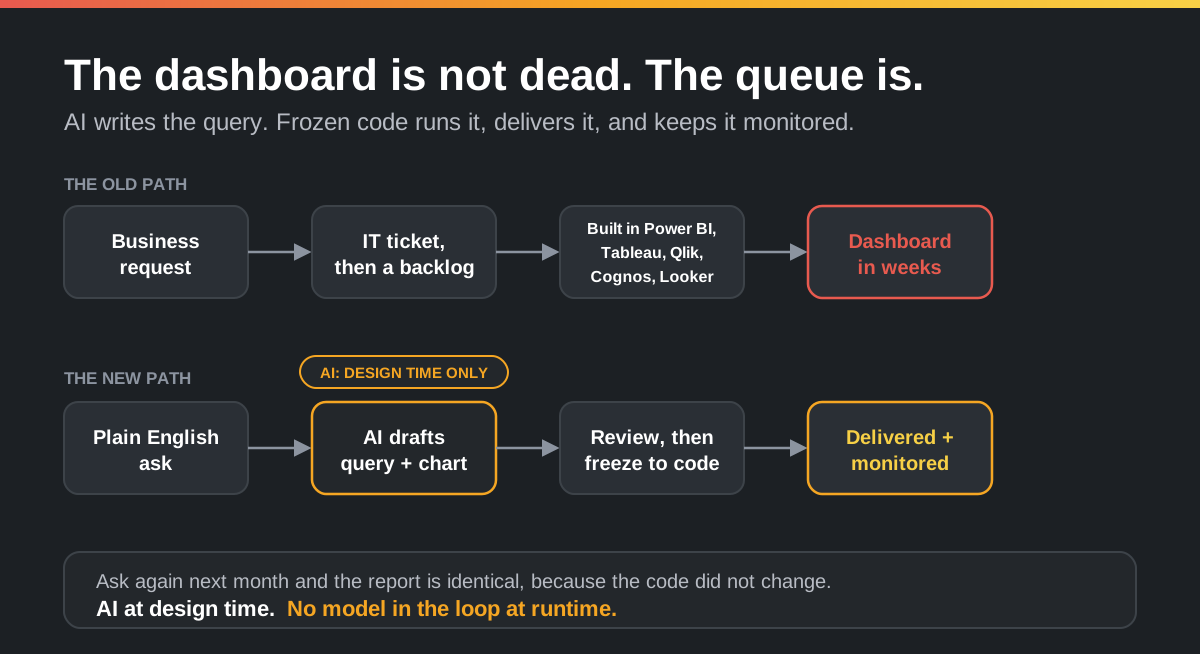
I can describe how a report has been born for the last fifteen years from the inside. Before Dittah I led a global business intelligence and enterprise reporting team, so the queue below is one I used to run, not one I imagined. A manager wants revenue by region by month, refreshed every week. She files a ticket. The ticket joins a queue. Eventually an analyst picks it up, models the data, and builds the view in Power BI, Tableau, Qlik, Cognos, or Looker. Weeks later a dashboard appears, and often the question has already moved on. The reporting tool was rarely the slow part. The queue and the specialist time in front of it were, and no amount of new dashboards ever shortened it.
What actually changed
The skill that used to gate all of this was knowing the schema, writing the query, and wiring up the visual. That is exactly the kind of work a capable model now drafts in seconds. Describe the report you want, and AI can produce the SQL, pick a sensible chart, and lay out the result. The part that needed a person and a backlog slot is now a short conversation. That is the real shift, and it is genuine.
Pulling the data is only half the job
There are really two skills hiding inside "make me a report," and they are not the same. The first is pulling the data: knowing where it lives, joining it correctly, filtering it to the right rows. The second is presenting it: choosing a chart that tells the truth, laying it out clearly, and delivering it in the form the reader actually wants. A query that returns the right numbers as a wall of rows is not a report. It is homework for whoever has to read it.
That second half is where a lot of the value sits, and it is where format matters. The same revenue figures might need to be a grouped bar chart on an operations dashboard, a branded PDF in the finance team's inbox every Monday, a formatted tab in a spreadsheet for the people who still live in Excel, or a clean JSON response for another system to consume. Presentation is not decoration. It is the difference between a number someone acts on and a number someone ignores.
What changed is that AI now drafts both halves from one description. Tell it the question and the shape you want it in, and it writes the query and the visualization together: the chart type, the labels, the formatting, the template with your branding, and the delivery. You still review what it produced, because you can read all of it. Then it is frozen, and the same query and the same chart come out the same way on every run.
Here is the whole move at once: a request on one side, and on the other the query that pulls the data, the visualization that presents it, and the frozen code that runs both and delivers them.
The question that actually matters: when does the model run?
Here is where most of the noise hides a real engineering decision. Generating a query and a chart from plain English is the easy part now. The decision that shapes everything afterward is when the model runs. There are two designs, and they look similar in a demo and behave nothing alike in production.
In the first, the model runs at runtime. Every time the report refreshes, a model reads the question, writes a query, runs it, and builds the chart. The report is regenerated from scratch on each run. In the second, the model runs at design time only. It drafts the query and the visualization once, a person reviews it, and the result is frozen into code. From then on that code runs on every schedule, and the model is no longer in the picture. The diagram above is the second design.
For a question you ask once, the difference barely matters. For a report that finance, a regulator, or a customer relies on every week, it is the whole game. We made the general version of this argument in why non-deterministic agents fail in production. Reporting is a clean place to see it, because a report is supposed to be the same answer to the same question.
What the two architectures look like
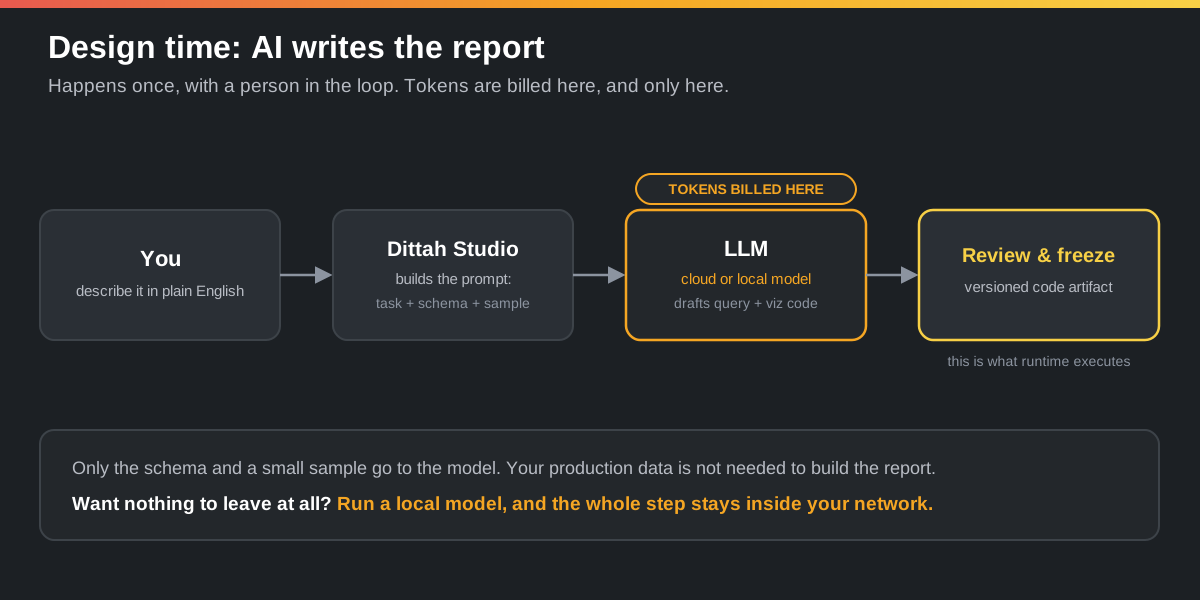
The difference is an architecture, not a slogan, so it is worth drawing. Design time is where the AI lives. You describe the report, Studio assembles a prompt from the task plus the schema and a small sample, and a model drafts the query and the visualization code. You read it, approve it, and freeze it into a versioned artifact. The model only ever sees the schema and a sample, never your production data, and if even that is too much for the data in question, the same step runs against a local model so nothing leaves your network. This is also the only place tokens are billed.
Runtime is where the AI is gone. A schedule or a trigger hands the frozen artifact to a deterministic execution engine. Inside your network, that engine reads your real data sources, runs the exact code your team approved, and renders the report. It then delivers in whatever format you asked for and writes a full record to monitoring. No model sits in this path, so there is nothing to drift, nothing to bill on each run, and a clear boundary your data does not cross.
That last point is the one that lets a regulated team say yes. Because nothing at runtime calls a model, your data never has to leave your data center. The execution engine runs on your own servers, on-premise or fully air-gapped, so customer records, financials, and anything else under compliance stay exactly where they already live. There is no outbound call to a third-party API holding your numbers, because by runtime there is no model to call.
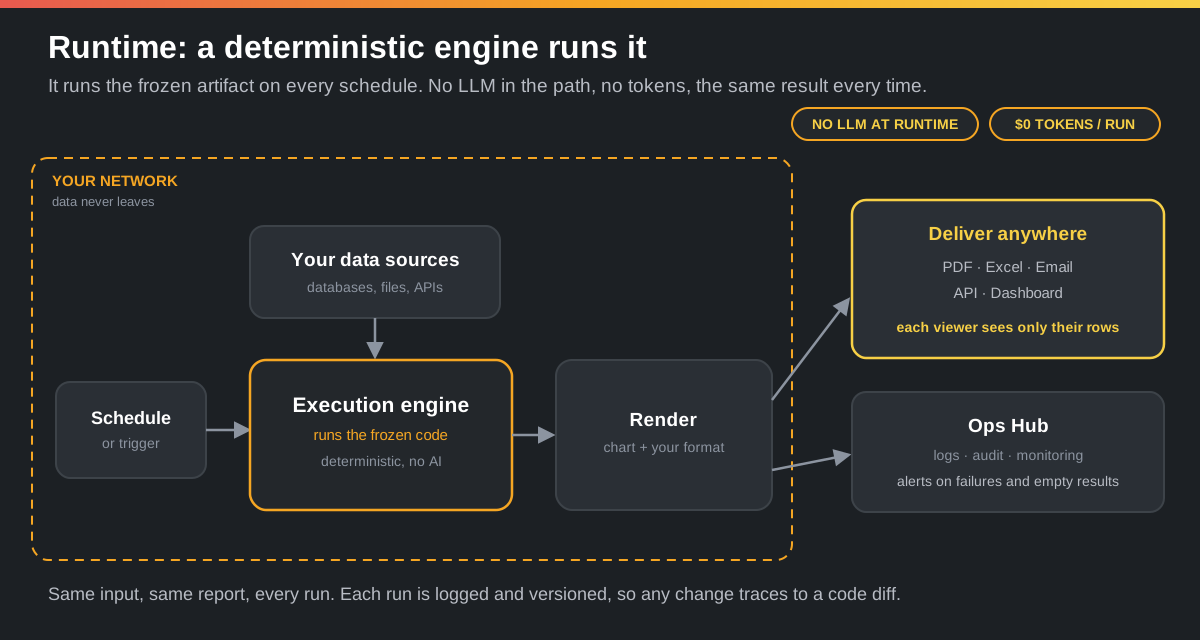
That boundary is the whole point. The expensive, non-deterministic, data-hungry part happens once, under review, against schema and samples. The part that touches real data and runs forever is plain code you can read, version, and audit. The cost lands where it belongs: you pay to build the report, not to run it.
LLM at runtime versus deterministic at runtime
Both designs have a place. The trade is real, so it is worth laying out plainly rather than pretending one wins everywhere.
| What you care about | LLM at runtime | AI at design time, deterministic at runtime |
|---|---|---|
| Reproducibility | The same question can produce a different query, number, or chart on different runs | The same input returns the same report on every run |
| Visualization consistency | Chart choice, labels, and formatting can drift between runs | The same chart, layout, and branding every time |
| Access control | You trust the model to apply row and column security correctly on a query it just wrote | Permissions are enforced in reviewed code, so the report inherits the viewer's entitlements |
| Cost per run | Pays the model on every refresh, and the bill grows with how often the report runs | No model at run time, so the runtime token cost is zero |
| Speed | Waits on model inference each time, which can be seconds to minutes | Runs at the speed of plain code against the database |
| Auditability | Hard to explain after the fact why a given number appeared | The exact query, code version, and inputs sit in the log |
| Data exposure | Sends data or schema to the model on every run | Live data never leaves your code when the report runs |
| Ad-hoc exploration | Strong, answers a brand new question on the spot | Needs a quick review and publish step for anything new |
| Worst failure | A plausible but wrong chart that no one notices | A visible error you can catch and fix |
Read the columns and a pattern shows up. A runtime model is at its best when the question is genuinely new and you are exploring, where flexibility is worth more than a perfect audit trail. Frozen code is at its best for anything you depend on more than once, where being right and reproducible matters more than answering a question nobody has asked yet. Most reporting is the second kind. The weekly numbers are not an exploration. They are a commitment.
The cost line deserves a second look, because it is easy to wave away in a pilot. A runtime model bills on every refresh, and a healthy report only runs more often over time. We worked through that math in the real cost of AI at runtime. Frozen code moves that cost to the moment you build the report and leaves the runtime at zero.
What a CTO asks before production
The architecture above already answers the big ones: where the data goes, what gets billed, and what runs without a model. The rest is governance, and it fits in a checklist. Run any AI reporting approach, ours or anyone's, through it before it touches real data.
- Data. Does live data leave your network at run time? It should not, and a local model plus on-premise execution keeps even the build step in house. See keeping sensitive data out of third-party LLMs.
- Access. Does the report inherit each viewer's row and column permissions, with tenant isolation in reviewed code, rather than show everyone everything?
- Audit. Is every run logged and the logic versioned, so a change traces to a code diff, not a model that drifted? Our compliance checklist covers what auditors ask.
- Reliability. Are failures, empty results, and anomalies alerted, not discovered later in a meeting?
- Cost. Is the runtime cost fixed, with no tokens per refresh and no analyst rebuilding it every quarter?
So are reporting and BI tools dead?
No, and the obituary misses what these tools were actually for. A governed metric that means the same thing in every report, access controls that keep the wrong people away from the wrong rows, a shared definition of "revenue" that the whole company trusts: none of that goes away because a model can write SQL. If anything it matters more, because faster report creation without a shared definition just means wrong numbers arrive faster. All of this assumes your data is curated well enough for AI to query correctly in the first place, which is its own discipline: we cover the pitfalls and the architecture in AI on top of your existing data.
What is dying is narrower and more specific. The ticket-to-dashboard cycle is dying. The assumption that every new report needs a specialist and a place in a queue is dying. The gap between asking a question and seeing a first answer is collapsing from weeks to minutes. The tools that adapt will absorb that change. The workflows built around the old wait are the part that does not survive.
Build it with AI, run it without one
This is the pattern we build for at Dittah, and it maps directly onto the diagram above. You describe the report in plain English, including the format you want. AI drafts the query that pulls the data and the visualization that presents it. You review what it wrote, because you can read it, and then you freeze it into code. That is how Build Studio works: the model helps you author, and a person approves what ships.
From there the report behaves like infrastructure rather than a request. It runs on a schedule, it enforces each viewer's permissions, and it is delivered where people actually work, whether that is a branded PDF in an inbox, a spreadsheet, a dashboard, or an API another system reads. Every run is watched, so a missing source or an empty result is caught and surfaced rather than discovered later when someone notices the chart looks wrong. We walked through this end to end for a finance process in a regulated report, automated end to end.
Bottom line
The reporting tool was never the bottleneck. The wait in front of it was, and AI removes that wait by drafting both the query and the visualization in minutes instead of weeks. The choice that decides whether you can trust the result is architectural, not cosmetic: let a model rebuild the report on every run, or let AI build it once and freeze it into code that runs the same way every time, under the permissions you set and the eyes of an audit log. Keep a runtime model for genuine exploration. For anything you report on more than once, freeze it.
If you want to feel the difference, watch the demo and build your first workflow against a report you already know, or download the free Community edition and run it on your own servers.