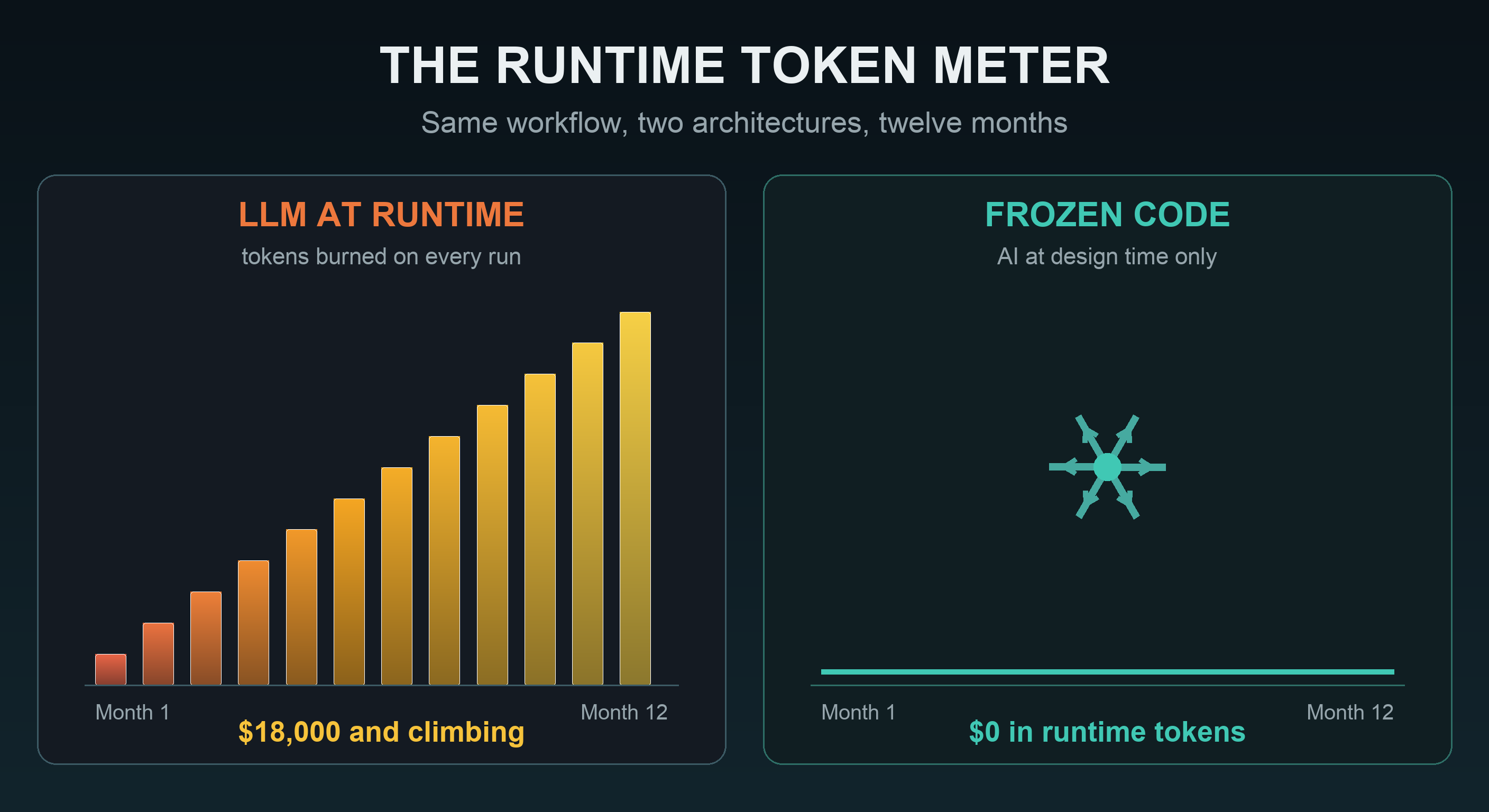
Here's the uncomfortable truth about most AI automation: every single run sends roughly the same prompt to an LLM, burns roughly the same tokens, and pays for the same reasoning all over again. Your workflow didn't get smarter on run #10,000. You just paid for run #10,000.
You're paying rent on logic you already own.
Do the Token Math
Take an ordinary automation: a daily report that ingests a data file, applies business logic, and produces a formatted output. Run through an LLM at runtime, a job like this typically consumes ~40,000 input tokens (your data, your instructions, your template) and ~2,000 output tokens per run. At typical frontier-model API pricing of around $3 per million input tokens and $15 per million output, that's:
$0.12 input + $0.03 output = $0.15 per run
Fifteen cents. Sounds like nothing, and that is exactly how token burn hides. Watch what happens as the workflow succeeds and usage grows:
Illustrative pricing: ~$3/M input + ~$15/M output tokens, ~42k tokens per run. Your workflow, model, and prompt sizes will vary. The shape of the curve won't.
And that's one workflow. Enterprises run dozens. The LLM-at-runtime bill scales with your success: more usage, more tokens, bigger invoice. Forever.
What a Year Looks Like
Now compare two architectures running the same workflow at 10,000 runs a month for a year. One calls the LLM on every execution. The other uses AI once, at design time, to generate the workflow as Python code, then freezes it and runs the code:
The "build once" bar is the AI cost of designing the workflow: a couple dozen generate-and-test iterations. After publishing, runtime token cost is zero, at any volume, indefinitely.
That ~$5 isn't a typo. Designing a workflow takes a handful of AI iterations: describe, generate, test, refine. Once the generated code is published and frozen, the LLM is out of the loop. Run it ten times or ten million times, the marginal token cost is zero.
It's Not Just the Bill
Token burn is the cost you can see on an invoice. Runtime LLMs charge you in other currencies too:
| LLM at runtime | Frozen code at runtime | |
|---|---|---|
| Token cost per run | ~$0.15, every run, forever | $0 |
| Same input → same output? | Not guaranteed | Guaranteed |
| Latency | Seconds to minutes, varies | Fast and consistent |
| Rate limits & outages | Your workflow inherits them | None. It's your code |
| When the auditor asks "how?" | Explain a black box | Show the versioned code |
For a finance team closing the books or an insurer processing claims, the second column isn't a nice-to-have. It's the requirement. A workflow that produces slightly different numbers on the same input isn't automation; it's a liability with an API bill.
Use AI Where It Pays Once
None of this means AI is the wrong tool. It means AI is in the wrong place. AI is extraordinary at understanding intent and writing logic, but expensive and unpredictable when executing the same task over and over. So put it where its strengths apply:
- Design time (AI): Describe the workflow in plain English. AI generates real, inspectable Python for ingestion, transformations, and outputs. Test it against your data, refine it conversationally.
- Runtime (code): Publish the workflow. Publishing freezes the generated code into a versioned, immutable artifact. Every execution after that is pure deterministic Python: no LLM calls, no token meter, no variance.
This is the architecture Dittah Studio is built on: build with intelligence, run with certainty. You get AI's speed where it compounds (creating the solution) and code's economics where they compound (running it at scale).
See It Happen
The fastest way to understand the build-once model is to watch it: in the Build Your First Workflow demo and tutorial, you'll see a plain-English description become generated Python, get tested against real data, and get published. That publish click is the exact moment the token meter stops. The step-by-step guide below the video lets you recreate it yourself in about 10 minutes.
Then do the math on your own workflows: count the runs, multiply by the tokens, and ask what that number looks like at twelve months. If the answer makes you wince, talk to us. Bring your highest-volume workflow and we'll show you what it costs frozen.